
If you are planning to start a YouTube channel in 2026, this may be one of the most valuable guides you will read.
Many beginners create a YouTube channel in just a few minutes but unknowingly make mistakes that later affect their channel’s growth, discoverability, branding, and monetization.
This guide is different.
Instead of simply showing you where to click, it explains why each step matters, how to avoid common mistakes, and how to build your channel on a strong foundation from day one.
By the time you finish this guide, you will know:
- How to create a YouTube channel the right way.
- Whether you should choose a Personal or Brand account.
- How to secure your account before uploading videos.
- The best settings every beginner should enable.
- Common mistakes that slow channel growth.
- What to do immediately after creating your channel.
Whether you are a student, creator, freelancer, business owner, teacher, or someone who simply wants to share knowledge with the world, this guide will help you start correctly.

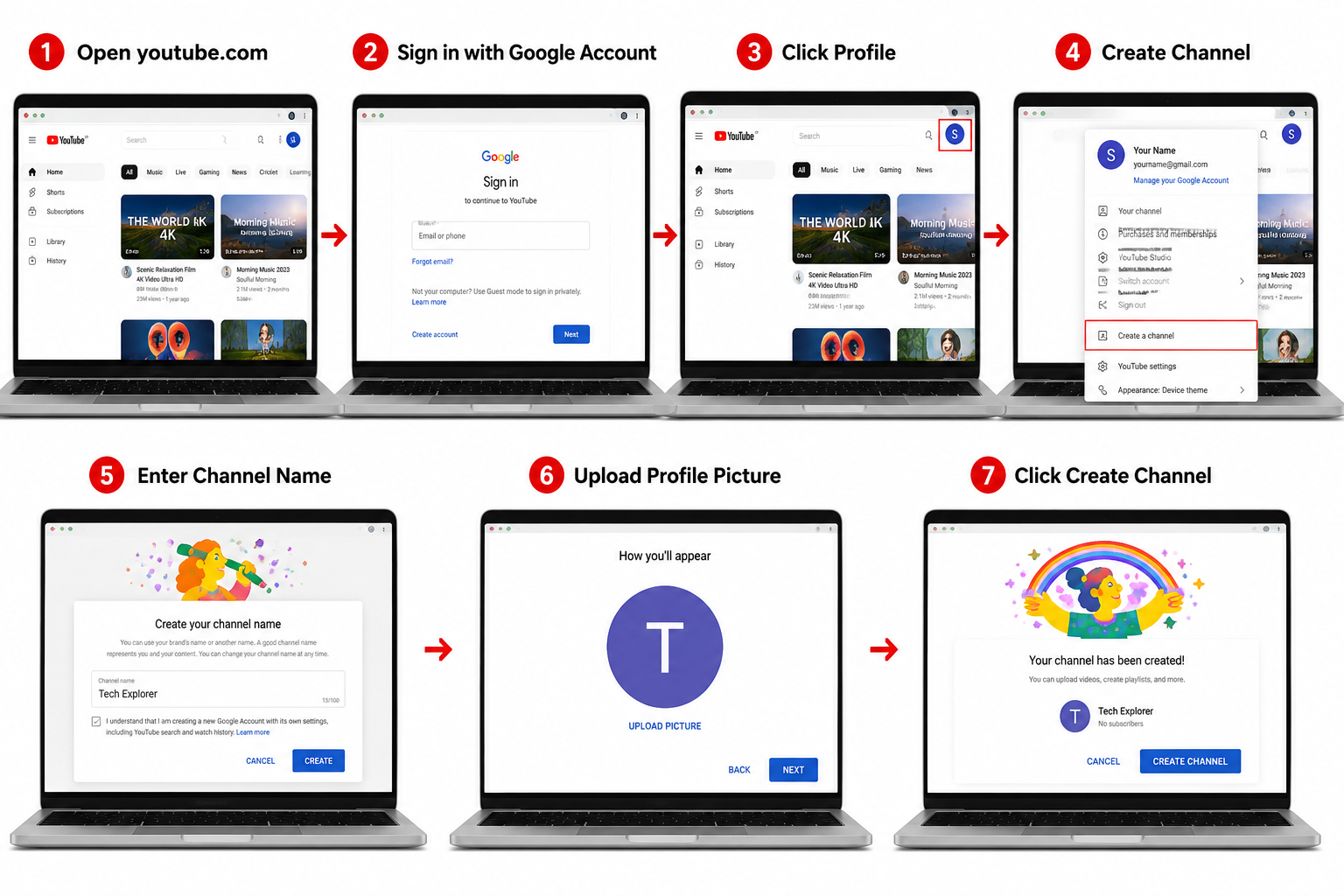
Creating a YouTube channel is simple, but creating it correctly is what makes the difference.
Sign in to YouTube using your Google account, create either a Personal or Brand Channel, verify your account, configure your channel settings, add branding, and prepare your channel before uploading your first video.
A properly configured channel gives you a better foundation for future growth.
What Is a YouTube Channel? (How to Create a YouTube Channel)
A YouTube channel is your personal or business space on YouTube where you publish videos, interact with viewers, organize playlists, build a community, and establish your online identity.
Think of your YouTube channel as your digital home. Every video you upload becomes part of your brand, making it easier for viewers to recognize your content and subscribe for future updates.
A well-organized YouTube channel is more than just a collection of videos—it reflects your expertise, consistency, and professionalism.
Why Start a YouTube Channel?
People start YouTube channels for many different reasons, including:
- Building a personal brand
- Growing a business
- Teaching valuable skills
- Sharing hobbies and experiences
- Creating educational content
- Promoting products or services
- Building an online community
- Earning income through monetization
Unlike many social media platforms where content quickly disappears, YouTube videos can continue attracting viewers for months or even years, making them valuable long-term assets.
Things You Need Before Creating a YouTube Channel
Before you create your channel, make sure you have the following ready:
A Google Account
A YouTube channel is linked to a Google account. If you don’t already have one, create it first.
A Strong Password
Protect your account with a secure password to reduce the risk of unauthorized access.
Two-Step Verification
Enable two-step verification to improve account security.
A Clear Channel Purpose
Decide what type of content you want to create before launching your channel.
A Channel Name
Choose a memorable and relevant name that reflects your content or brand.
A Profile Picture or Logo
Prepare a professional profile image that represents your identity.
A Banner Concept
Your banner is often the first visual impression visitors have of your channel.
Your First 10 Video Ideas
Planning your initial videos helps you stay consistent after launching your channel.
🎯 Pro Tip
Don’t create a YouTube channel just because everyone else is doing it.
Create one because you have a clear purpose, a target audience, and a long-term content plan.
Successful channels are built on consistency and value—not on luck.
🇮🇳 हिंदी अनुवाद
YouTube Channel कैसे बनाएं (2026 Complete Guide)
यह पूरा Article क्यों पढ़ना चाहिए?
यदि आप 2026 में अपना YouTube Channel शुरू करना चाहते हैं, तो यह Guide आपके लिए बनाई गई है।
अधिकांश नए Creator सिर्फ कुछ मिनटों में Channel बना लेते हैं, लेकिन शुरुआत में ही ऐसी गलतियाँ कर बैठते हैं जो आगे चलकर Growth, Monetization और Branding पर असर डालती हैं।
इस Guide में केवल “क्या करना है” नहीं, बल्कि “क्यों करना है” भी विस्तार से बताया जाएगा।
इस Guide को पूरा पढ़ने के बाद आप जानेंगे:
- YouTube Channel सही तरीके से कैसे बनाएं।
- Personal और Brand Channel में क्या अंतर है।
- Channel को सुरक्षित कैसे रखें।
- शुरुआत में कौन-कौन सी Settings करनी चाहिए।
- नए Creator कौन सी सामान्य गलतियाँ करते हैं।
- Channel बनाने के बाद अगला कदम क्या होना चाहिए।
यदि आप Student, Creator, Freelancer, Teacher या Business Owner हैं, तो यह Guide आपके लिए उपयोगी होगी।
Quick Answer
YouTube Channel बनाने के लिए Google Account से YouTube में Sign In करें, नया Channel बनाएं, उसे Verify करें, आवश्यक Settings पूरी करें, Branding करें और उसके बाद अपना पहला Video Upload करें।
सही तरीके से तैयार किया गया Channel भविष्य में बेहतर Growth के लिए मजबूत आधार बनता है।
YouTube Channel क्या है?
YouTube Channel आपका वह डिजिटल स्थान है जहाँ आप Videos Upload करते हैं, Playlist बनाते हैं, अपने Viewers से जुड़ते हैं और अपनी ऑनलाइन पहचान बनाते हैं।
इसे अपने Digital Home की तरह समझें। आपके सभी Videos, Branding और जानकारी मिलकर आपके Channel की पहचान बनाते हैं।

Disclaimer
The information provided in this article is for educational and informational purposes only. While we strive to keep the content accurate and up to date, YouTube’s features, policies, interface, and guidelines may change over time.
We are not affiliated with, endorsed by, or sponsored by YouTube or Google. All trademarks, logos, and brand names are the property of their respective owners.
Before making any important decisions regarding your YouTube channel, monetization, or account settings, we recommend verifying the latest information from YouTube’s official resources.
TechSmartUpdates is not responsible for any loss, account issues, policy violations, or financial decisions resulting from the use of the information provided in this article.
By using this website, you agree that you are responsible for your own actions and decisions.
डिस्क्लेमर
इस लेख में दी गई जानकारी केवल शैक्षणिक (Educational) और सामान्य जानकारी (Informational Purpose) के लिए है। हम सामग्री को सही और अद्यतन रखने का पूरा प्रयास करते हैं, लेकिन समय-समय पर YouTube की नीतियाँ, फीचर्स, इंटरफेस और दिशानिर्देश बदल सकते हैं।
हम YouTube या Google से किसी भी प्रकार से संबद्ध, अधिकृत, प्रायोजित या प्रतिनिधित्व करने वाले नहीं हैं। सभी ट्रेडमार्क, लोगो और ब्रांड नाम उनके संबंधित स्वामियों की संपत्ति हैं।
अपने YouTube चैनल, मोनेटाइजेशन, कॉपीराइट, या अकाउंट सेटिंग्स से संबंधित कोई भी महत्वपूर्ण निर्णय लेने से पहले कृपया YouTube के आधिकारिक दिशानिर्देशों की पुष्टि अवश्य करें।
इस लेख में दी गई जानकारी के उपयोग से होने वाले किसी भी नुकसान, अकाउंट संबंधी समस्या, नीति उल्लंघन या आर्थिक निर्णय के लिए TechSmartUpdates जिम्मेदार नहीं होगा।
इस वेबसाइट का उपयोग करके आप स्वीकार करते हैं कि आपके सभी निर्णय और कार्यों की जिम्मेदारी आपकी स्वयं की होगी।